Welcome to the latest in my series of posts on Graphics with the SAM Coupé.
You can find the other posts in this series here;
The GitHub Repo
You can find all the files for the series in my GitHub Repo here;
https://github.com/pjgpetecodes/samcoupegraphics
Making SAM Coupé Sprites Transparent
In the previous graphics tutorial, we worked up from a simple square sprite to copying sprite rows with repeated LDI instructions;
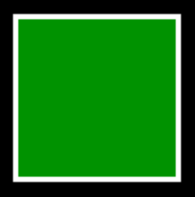
That is a quick way to put pixels on the screen, but it has one obvious limitation: every byte in the sprite rectangle is copied, including the pixels that are meant to be empty.
The SAM Coupé Sprite Editor
From this point onward, the tutorials will use my SAM Coupé Sprite Editor:
https://www.petecodes.co.uk/sam-coupe-sprite-editor
The editor produces sprite data in three formats:
- Regular Sprite Data – Raw MODE 4 pixel bytes (the same format used in the previous tutorial).
- Mask Data – One byte per pixel byte, controlling which screen bits are preserved.
- Interleaved Data – Mask and pixel bytes stored together, which is the most convenient format for the drawing routine in this tutorial.
This blog post introduces the Mask and Interleaved formats. The next post will use the same interleaved data to animate the Oliver Twin’s cartoon character Dizzy’s frames;
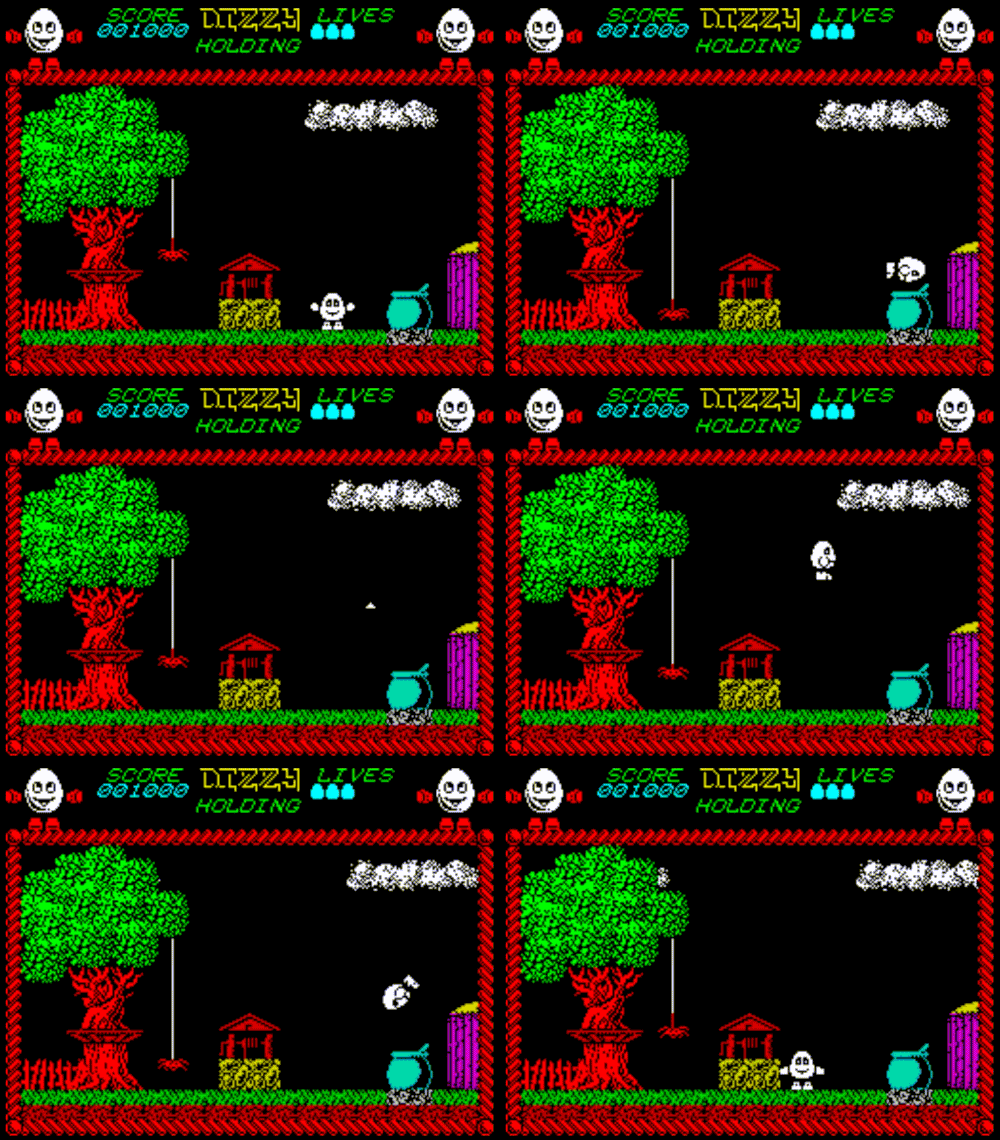
Later posts will build on this foundation to address flicker and performance.
Why a Copied Sprite has a Background
Consider the following Sprite of our friend Dizzy;
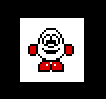
The Sprite Data is;
Sprite1_1:    DEFB      0xFF, 0xFF, 0xFF, 0xFF, 0xFF, 0xFF, 0xFF, 0xFF, 0xFF, 0xFF, 0xFF, 0xFF, 0xFF, 0xFF, 0xFF, 0xFF
Sprite1_2:    DEFB      0xFF, 0xFF, 0xFF, 0xFF, 0xFF, 0xFF, 0xFF, 0xFF, 0xFF, 0xFF, 0xFF, 0xFF, 0xFF, 0xFF, 0xFF, 0xFF
Sprite1_3:    DEFB      0xFF, 0xFF, 0xFF, 0xFF, 0xFF, 0xFF, 0xFF, 0xFF, 0xFF, 0xFF, 0xFF, 0xFF, 0xFF, 0xFF, 0xFF, 0xFF
Sprite1_4:    DEFB      0xFF, 0xFF, 0xFF, 0xFF, 0xFF, 0xFF, 0xFF, 0xFF, 0xFF, 0xFF, 0xFF, 0xFF, 0xFF, 0xFF, 0xFF, 0xFF
Sprite1_5:    DEFB      0xFF, 0xFF, 0xFF, 0xFF, 0xFF, 0xFF, 0xFF, 0xFF, 0xFF, 0xFF, 0xFF, 0xFF, 0xFF, 0xFF, 0xFF, 0xFF
Sprite1_6:    DEFB      0xFF, 0xFF, 0xFF, 0xFF, 0xFF, 0xFF, 0xF0, 0x00, 0x00, 0xFF, 0xFF, 0xFF, 0xFF, 0xFF, 0xFF, 0xFF
Sprite1_7:    DEFB      0xFF, 0xFF, 0xFF, 0xFF, 0xFF, 0xFF, 0x0F, 0xFF, 0xFF, 0x0F, 0xFF, 0xFF, 0xFF, 0xFF, 0xFF, 0xFF
Sprite1_8:    DEFB      0xFF, 0xFF, 0xFF, 0xFF, 0xFF, 0xF0, 0xFF, 0xFF, 0xFF, 0xF0, 0xFF, 0xFF, 0xFF, 0xFF, 0xFF, 0xFF
Sprite1_9:    DEFB      0xFF, 0xFF, 0xFF, 0xFF, 0xFF, 0x0F, 0xF0, 0x0F, 0x00, 0xFF, 0x0F, 0xFF, 0xFF, 0xFF, 0xFF, 0xFF
Sprite1_10:   DEFB      0xFF, 0xFF, 0xFF, 0xFF, 0xFF, 0x0F, 0x0F, 0xF0, 0xFF, 0x0F, 0x0F, 0xFF, 0xFF, 0xFF, 0xFF, 0xFF
Sprite1_11:   DEFB      0xFF, 0xFF, 0xFF, 0xFF, 0xF0, 0xF0, 0xFF, 0xF0, 0xFF, 0xF0, 0xF0, 0xFF, 0xFF, 0xFF, 0xFF, 0xFF
Sprite1_12:   DEFB      0xFF, 0xFF, 0xFF, 0xFF, 0xF0, 0xF0, 0xF0, 0x00, 0x00, 0xF0, 0xF0, 0xFF, 0xFF, 0xFF, 0xFF, 0xFF
Sprite1_13:   DEFB      0xFF, 0xFF, 0xFF, 0xFF, 0xF0, 0xF0, 0xF0, 0x00, 0x00, 0xF0, 0xF0, 0xFF, 0xFF, 0xFF, 0xFF, 0xFF
Sprite1_14:   DEFB      0xFF, 0xFF, 0xF0, 0x00, 0x0F, 0xFF, 0x00, 0xFF, 0xF0, 0x0F, 0xFF, 0x00, 0x00, 0xFF, 0xFF, 0xFF
Sprite1_15:   DEFB      0xFF, 0xFF, 0x0A, 0xAA, 0x0F, 0xFF, 0xFF, 0x00, 0x0F, 0xFF, 0xFF, 0x0A, 0xAA, 0x0F, 0xFF, 0xFF
Sprite1_16:   DEFB      0xFF, 0xFF, 0x0A, 0xAA, 0x0F, 0xF0, 0xFF, 0xFF, 0xFF, 0xF0, 0xFF, 0x0A, 0xAA, 0x0F, 0xFF, 0xFF
Sprite1_17:   DEFB      0xFF, 0xFF, 0x0A, 0xAA, 0x0F, 0xFF, 0x00, 0x00, 0x00, 0x0F, 0xFF, 0x0A, 0xAA, 0x0F, 0xFF, 0xFF
Sprite1_18:   DEFB      0xFF, 0xFF, 0x0A, 0xAA, 0x0F, 0xFF, 0xF0, 0x00, 0x00, 0xFF, 0xFF, 0x0A, 0xAA, 0x0F, 0xFF, 0xFF
Sprite1_19:   DEFB      0xFF, 0xFF, 0xF0, 0x00, 0xF0, 0xFF, 0xFF, 0xFF, 0xFF, 0xFF, 0xF0, 0xF0, 0x00, 0xFF, 0xFF, 0xFF
Sprite1_20:   DEFB      0xFF, 0xFF, 0xFF, 0xFF, 0xFF, 0x0F, 0xFF, 0xFF, 0xFF, 0xFF, 0x0F, 0xFF, 0xFF, 0xFF, 0xFF, 0xFF
Sprite1_21:   DEFB      0xFF, 0xFF, 0xFF, 0xFF, 0xFF, 0xF0, 0x0F, 0xFF, 0xFF, 0x00, 0xFF, 0xFF, 0xFF, 0xFF, 0xFF, 0xFF
Sprite1_22:   DEFB      0xFF, 0xFF, 0xFF, 0xFF, 0xFF, 0xF0, 0x00, 0x00, 0x00, 0x00, 0xFF, 0xFF, 0xFF, 0xFF, 0xFF, 0xFF
Sprite1_23:   DEFB      0xFF, 0xFF, 0xFF, 0xFF, 0xFF, 0x0A, 0xAA, 0xAF, 0xAA, 0xAA, 0x0F, 0xFF, 0xFF, 0xFF, 0xFF, 0xFF
Sprite1_24:   DEFB      0xFF, 0xFF, 0xFF, 0xFF, 0xF0, 0xAA, 0xAF, 0xA0, 0xAF, 0xAA, 0xA0, 0xFF, 0xFF, 0xFF, 0xFF, 0xFF
Sprite1_25:   DEFB      0xFF, 0xFF, 0xFF, 0xFF, 0xF0, 0xAA, 0xAA, 0xA0, 0xAA, 0xAA, 0xA0, 0xFF, 0xFF, 0xFF, 0xFF, 0xFF
Sprite1_26:   DEFB      0xFF, 0xFF, 0xFF, 0xFF, 0xF0, 0xAA, 0xAA, 0xA0, 0xAA, 0xAA, 0xA0, 0xFF, 0xFF, 0xFF, 0xFF, 0xFF
Sprite1_27:   DEFB      0xFF, 0xFF, 0xFF, 0xFF, 0xF0, 0x00, 0x00, 0x0F, 0x00, 0x00, 0x00, 0xFF, 0xFF, 0xFF, 0xFF, 0xFF
Sprite1_28:   DEFB      0xFF, 0xFF, 0xFF, 0xFF, 0xFF, 0xFF, 0xFF, 0xFF, 0xFF, 0xFF, 0xFF, 0xFF, 0xFF, 0xFF, 0xFF, 0xFF
Sprite1_29:   DEFB      0xFF, 0xFF, 0xFF, 0xFF, 0xFF, 0xFF, 0xFF, 0xFF, 0xFF, 0xFF, 0xFF, 0xFF, 0xFF, 0xFF, 0xFF, 0xFF
Sprite1_30:   DEFB      0xFF, 0xFF, 0xFF, 0xFF, 0xFF, 0xFF, 0xFF, 0xFF, 0xFF, 0xFF, 0xFF, 0xFF, 0xFF, 0xFF, 0xFF, 0xFF
Sprite1_31:   DEFB      0xFF, 0xFF, 0xFF, 0xFF, 0xFF, 0xFF, 0xFF, 0xFF, 0xFF, 0xFF, 0xFF, 0xFF, 0xFF, 0xFF, 0xFF, 0xFF
Sprite1_32: DEFB 0xFF, 0xFF, 0xFF, 0xFF, 0xFF, 0xFF, 0xFF, 0xFF, 0xFF, 0xFF, 0xFF, 0xFF, 0xFF, 0xFF, 0xFF, 0xFFIn MODE 4, one byte holds two adjacent pixels. Each pixel is a four‑bit colour index. You can see this in the sprite data above, where the whole first line is basically white pixels.
Where we have a byte such as &F0 such as in Sprite1_6, it contains colour F (white) followed by colour 0 (black). Both colours are of course real screen colours; neither automatically mean “transparent.”
The previous copy routine treats the sprite as a rectangle of pixel data. The routine will writes each pixel to the screen without considering transparency. To leave the existing screen unchanged at a given pixel, the drawing routine needs to know which bits belong to the sprite and which bits should be kept from the background.
This is the core problem transparency solves.
Create a “Mask”
To add transparency, we extend the sprite format introduced in the previous tutorial. Up to now, a sprite was simply a sequence of pixel bytes – Each byte containing two MODE 4 colour nibbles. That format is still valid, but it cannot preserve the background behind “empty” pixels.
To solve this, and temporarily for now as it’s not the most efficient method, we introduce a second data block that sits alongside the pixel data;
Sprite1_M_1:    DEFB    0xFF, 0xFF, 0xFF, 0xFF, 0xFF, 0xFF, 0xFF, 0xFF, 0xFF, 0xFF, 0xFF, 0xFF, 0xFF, 0xFF, 0xFF, 0xFF
Sprite1_M_2:    DEFB    0xFF, 0xFF, 0xFF, 0xFF, 0xFF, 0xFF, 0xFF, 0xFF, 0xFF, 0xFF, 0xFF, 0xFF, 0xFF, 0xFF, 0xFF, 0xFF
Sprite1_M_3:    DEFB    0xFF, 0xFF, 0xFF, 0xFF, 0xFF, 0xFF, 0xFF, 0xFF, 0xFF, 0xFF, 0xFF, 0xFF, 0xFF, 0xFF, 0xFF, 0xFF
Sprite1_M_4:    DEFB    0xFF, 0xFF, 0xFF, 0xFF, 0xFF, 0xFF, 0xFF, 0xFF, 0xFF, 0xFF, 0xFF, 0xFF, 0xFF, 0xFF, 0xFF, 0xFF
Sprite1_M_5:    DEFB    0xFF, 0xFF, 0xFF, 0xFF, 0xFF, 0xFF, 0xF0, 0x00, 0x00, 0xFF, 0xFF, 0xFF, 0xFF, 0xFF, 0xFF, 0xFF
Sprite1_M_6:    DEFB    0xFF, 0xFF, 0xFF, 0xFF, 0xFF, 0xFF, 0x00, 0x00, 0x00, 0x0F, 0xFF, 0xFF, 0xFF, 0xFF, 0xFF, 0xFF
Sprite1_M_7:    DEFB    0xFF, 0xFF, 0xFF, 0xFF, 0xFF, 0xF0, 0x00, 0x00, 0x00, 0x00, 0xFF, 0xFF, 0xFF, 0xFF, 0xFF, 0xFF
Sprite1_M_8:    DEFB    0xFF, 0xFF, 0xFF, 0xFF, 0xFF, 0x00, 0x00, 0x00, 0x00, 0x00, 0x0F, 0xFF, 0xFF, 0xFF, 0xFF, 0xFF
Sprite1_M_9:    DEFB    0xFF, 0xFF, 0xFF, 0xFF, 0xF0, 0x00, 0x00, 0x00, 0x00, 0x00, 0x00, 0xFF, 0xFF, 0xFF, 0xFF, 0xFF
Sprite1_M_10:   DEFB    0xFF, 0xFF, 0xFF, 0xFF, 0xF0, 0x00, 0x00, 0x00, 0x00, 0x00, 0x00, 0xFF, 0xFF, 0xFF, 0xFF, 0xFF
Sprite1_M_11:   DEFB    0xFF, 0xFF, 0xFF, 0xFF, 0x00, 0x00, 0x00, 0x00, 0x00, 0x00, 0x00, 0x0F, 0xFF, 0xFF, 0xFF, 0xFF
Sprite1_M_12:   DEFB    0xFF, 0xFF, 0xFF, 0xFF, 0x00, 0x00, 0x00, 0x00, 0x00, 0x00, 0x00, 0x0F, 0xFF, 0xFF, 0xFF, 0xFF
Sprite1_M_13:   DEFB    0xFF, 0xFF, 0xF0, 0x00, 0x00, 0x00, 0x00, 0x00, 0x00, 0x00, 0x00, 0x00, 0x00, 0xFF, 0xFF, 0xFF
Sprite1_M_14:   DEFB    0xFF, 0xFF, 0x00, 0x00, 0x00, 0x00, 0x00, 0x00, 0x00, 0x00, 0x00, 0x00, 0x00, 0x0F, 0xFF, 0xFF
Sprite1_M_15:   DEFB    0xFF, 0xF0, 0x00, 0x00, 0x00, 0x00, 0x00, 0x00, 0x00, 0x00, 0x00, 0x00, 0x00, 0x00, 0xFF, 0xFF
Sprite1_M_16:   DEFB    0xFF, 0xF0, 0x00, 0x00, 0x00, 0x00, 0x00, 0x00, 0x00, 0x00, 0x00, 0x00, 0x00, 0x00, 0xFF, 0xFF
Sprite1_M_17:   DEFB    0xFF, 0xF0, 0x00, 0x00, 0x00, 0x00, 0x00, 0x00, 0x00, 0x00, 0x00, 0x00, 0x00, 0x00, 0xFF, 0xFF
Sprite1_M_18:   DEFB    0xFF, 0xF0, 0x00, 0x00, 0x00, 0x00, 0x00, 0x00, 0x00, 0x00, 0x00, 0x00, 0x00, 0x00, 0xFF, 0xFF
Sprite1_M_19:   DEFB    0xFF, 0xFF, 0x00, 0x00, 0x00, 0x00, 0x00, 0x00, 0x00, 0x00, 0x00, 0x00, 0x00, 0x0F, 0xFF, 0xFF
Sprite1_M_20:   DEFB    0xFF, 0xFF, 0xF0, 0x00, 0xF0, 0x00, 0x00, 0x00, 0x00, 0x00, 0x00, 0xF0, 0x00, 0xFF, 0xFF, 0xFF
Sprite1_M_21:   DEFB    0xFF, 0xFF, 0xFF, 0xFF, 0xFF, 0x00, 0x00, 0x00, 0x00, 0x00, 0x0F, 0xFF, 0xFF, 0xFF, 0xFF, 0xFF
Sprite1_M_22:   DEFB    0xFF, 0xFF, 0xFF, 0xFF, 0xFF, 0x00, 0x00, 0x00, 0x00, 0x00, 0x0F, 0xFF, 0xFF, 0xFF, 0xFF, 0xFF
Sprite1_M_23:   DEFB    0xFF, 0xFF, 0xFF, 0xFF, 0xF0, 0x00, 0x00, 0x00, 0x00, 0x00, 0x00, 0xFF, 0xFF, 0xFF, 0xFF, 0xFF
Sprite1_M_24:   DEFB    0xFF, 0xFF, 0xFF, 0xFF, 0x00, 0x00, 0x00, 0x00, 0x00, 0x00, 0x00, 0x0F, 0xFF, 0xFF, 0xFF, 0xFF
Sprite1_M_25:   DEFB    0xFF, 0xFF, 0xFF, 0xFF, 0x00, 0x00, 0x00, 0x00, 0x00, 0x00, 0x00, 0x0F, 0xFF, 0xFF, 0xFF, 0xFF
Sprite1_M_26:   DEFB    0xFF, 0xFF, 0xFF, 0xFF, 0x00, 0x00, 0x00, 0x00, 0x00, 0x00, 0x00, 0x0F, 0xFF, 0xFF, 0xFF, 0xFF
Sprite1_M_27:   DEFB    0xFF, 0xFF, 0xFF, 0xFF, 0x00, 0x00, 0x00, 0x00, 0x00, 0x00, 0x00, 0x0F, 0xFF, 0xFF, 0xFF, 0xFF
Sprite1_M_28:   DEFB    0xFF, 0xFF, 0xFF, 0xFF, 0xF0, 0x00, 0x00, 0x0F, 0x00, 0x00, 0x00, 0xFF, 0xFF, 0xFF, 0xFF, 0xFF
Sprite1_M_29:   DEFB    0xFF, 0xFF, 0xFF, 0xFF, 0xFF, 0xFF, 0xFF, 0xFF, 0xFF, 0xFF, 0xFF, 0xFF, 0xFF, 0xFF, 0xFF, 0xFF
Sprite1_M_30:   DEFB    0xFF, 0xFF, 0xFF, 0xFF, 0xFF, 0xFF, 0xFF, 0xFF, 0xFF, 0xFF, 0xFF, 0xFF, 0xFF, 0xFF, 0xFF, 0xFF
Sprite1_M_31:   DEFB    0xFF, 0xFF, 0xFF, 0xFF, 0xFF, 0xFF, 0xFF, 0xFF, 0xFF, 0xFF, 0xFF, 0xFF, 0xFF, 0xFF, 0xFF, 0xFF
Sprite1_M_32: DEFB 0xFF, 0xFF, 0xFF, 0xFF, 0xFF, 0xFF, 0xFF, 0xFF, 0xFF, 0xFF, 0xFF, 0xFF, 0xFF, 0xFF, 0xFF, 0xFFSo, with above added in to our file, we end up with two sets of data per sprite;
1. Sprite colour data
This is the same raw MODE 4 pixel data used the same was as in Blog 2 (But now Dizzy). It contains the sprite’s colours and shape. The sprite editor calls this Regular Sprite Data.
2. Sprite mask data
This is a new block of bytes, aligned one‑for‑one with the pixel data. Each mask byte controls which bits of the screen should be preserved. The editor calls this Mask Data.
Together, these two blocks describe a transparent sprite, and as such we now have two corresponding bytes per single sprite, along with then what is currently shown on the screen;
pixel_data byte
mask byte
screen byteThe mask controls which existing screen bits survive. A set mask bit keeps the corresponding screen bit; a clear mask bit lets the sprite data supply it.
The routine combines all of these bytes in two operations:
result = (screen AND mask) OR pixel_dataFor example:
- An empty pixel nibble uses mask
Fand data0→ the mask keeps the old screen nibble → the zero data does not change it - An opaque pixel nibble uses mask
0and places its colour in the data byte → the old screen nibble is cleared → the sprite colour replaces it
Because MODE 4 packs two pixels into a byte, the mask and data each describe both nibbles. The sprite may therefore preserve one pixel and replace the other.
This format is the foundation for transparent sprites.
The Full Assembly
Full Assembly Listing for 4.asm
Draw the Sprite with the Mask
We now need to draw our mask/data pairs. The loop reads a mask, combines it with the screen byte, then ORs in the sprite’s pixel data;
;
; ***********************************************************************************
; *                               Draw Masked Sprite                                *
; ***********************************************************************************
;
Draw_Sprite:    LD      C,32             ; Process all 32 sprite rows
;
Sprite_Row:     PUSH    BC               ; Preserve row count while B counts bytes
                LD      B,16             ; Process the 16 sprite bytes in this row
;
Sprite_Byte:    LD      A,(DE)           ; Read the mask byte
                AND     (HL)             ; Keep screen bits selected by the mask
                LD      C,A              ; Save the masked background byte
                INC     DE               ; Point to the corresponding pixel byte
                LD      A,(DE)           ; Read the cleaned sprite pixels
                OR      C                ; Combine sprite pixels with the background
                LD      (HL),A           ; Write the combined byte to the screen
                INC     DE               ; Point to the next mask/pixel pair
                INC     HL               ; Advance to the next screen byte
                DJNZ    Sprite_Byte      ; Continue across the 16-byte sprite row
                LD      BC,112           ; Skip the rest of the 128-byte screen row
                ADD     HL,BC            ; Point to the next screen row
                POP     BC               ; Restore the sprite row counter
                DEC     C                ; Count down the sprite rows
                JR      NZ,Sprite_Row    ; Continue until all 32 rows are drawn
RET ; Return after drawing the spriteThe key change is that drawing a sprite no longer means blindly copying its rectangle: each pixel can either replace or preserve what is already on screen.
32×16 Sprite Rows
Draw_Sprite:    LD      C,32             ; Process all 32 sprite rows
;
Sprite_Row:     PUSH    BC               ; Preserve row count while B counts bytes
LD B,16 ; Process the 16 sprite bytes in this rowThe sprite is 32 rows tall, so the routine begins by loading C = 32. Each row contains 16 bytes of MODE 4 pixel data (32 pixels), so the inner loop sets B = 16.
The structure is:
- Outer loop: 32 rows
- Inner loop: 16 bytes per row
- Each byte: mask + pixel pair
Masking the Background
Sprite_Byte:    LD      A,(DE)           ; Read the mask byte
                AND     (HL)             ; Keep screen bits selected by the mask
LD C,A ; Save the masked background byteThe first byte in each pair is the mask, which is the key transparency operation;
- If the mask nibble is
F, the background nibble survives. - If the mask nibble is
0, the background nibble is cleared.
Because MODE 4 packs two pixels per byte, each mask byte controls two pixels.
Applying the Sprite Pixel Data
                INC     DE               ; Point to the corresponding pixel byte
                LD      A,(DE)           ; Read the cleaned sprite pixels
                OR      C                ; Combine sprite pixels with the background
LD (HL),A ; Write the combined byte to the screenThe second byte in each pair is the sprite’s pixel colour, which produces;
result = (screen AND mask) OR pixel_dataWhich is exactly the formula we introduced earlier.
Advancing Through the Sprite and Screen
               INC     DE               ; Point to the next mask/pixel pair
               INC     HL               ; Advance to the next screen byte
DJNZ Sprite_Byte ; Continue across the 16-byte sprite rowImmediately after writing the combined byte, the routine advances both pointers. This keeps the mask/pixel pairs and the screen perfectly aligned;
HL always points to the next screen byteDE always points to the next mask byte
The inner loop of DJNZ repeats from the Sprite_Byte label 16 times to process the entire row.
Advancing to the Next Row
                LD      BC,112           ; Skip the rest of the 128-byte screen row
                ADD     HL,BC            ; Point to the next screen row
                POP     BC               ; Restore the sprite row counter
                DEC     C                ; Count down the sprite rows
JR NZ,Sprite_Row ; Continue until all 32 rows are drawnOnce all 16 bytes in the row have been drawn, the routine must move HL to the start of the next screen row. A MODE 4 row is 128 bytes wide, but the sprite only covers 16 of them, so the routine skips the remaining 112 bytes.
We then retrieve the Sprite Row Counter and decrement it, before looping back to the Sprite_Row label if we’re not on the last row.
Interleaving the Data
For the sharp of eye, you’ll notice in the draw routine that we are actually grabbing what we call “interleaved bytes“. That is, we have retrieved a Mask and then a main Sprite Byte one after another from memory.
So the data is laid out like this in memory;
mask byte, pixel byte, mask byte, pixel byte, ...To achieve this, we have the Build_Interleaved routine which copies the sprite and mask data to memory to be read by the Draw_Sprite routine;
;
; ***********************************************************************************
; *                         Build Mask/Pixel Sprite Data                            *
; ***********************************************************************************
;
Build_Interleaved:
                LD      HL,Sprite1_Pixels ; Point to the source colour bytes
                LD      IX,Sprite1_Mask   ; Point to the matching mask bytes
                LD      DE,Sprite1_Interleaved  ; Point to the interleaved output buffer
                LD      B,32                    ; 32 rows in the sprite
;
Interleave_Row: PUSH    BC              ; Keep the row counter while processing a row
                LD      C,16            ; 16 packed pixel bytes per row
;
Interleave_Byte:
                LD      A,(IX+0)        ; Read the mask byte
                LD      (DE),A          ; Store the mask before its pixel byte
                INC     DE              ; Advance to the pixel byte in the buffer
                CPL                     ; Transparent bits must contribute zero
                AND     (HL)            ; Clear the white matte where the mask is transparent
                LD      (DE),A          ; Store the cleaned pixel byte
                INC     DE              ; Advance to the next mask/pixel pair
                INC     HL              ; Point to the next source colour byte
                INC     IX              ; Point to the next source mask byte
                DEC     C               ; Count down the 16 bytes in this row
                JR      NZ,Interleave_Byte ; Continue until this row is complete
                POP     BC              ; Restore the row counter
                DJNZ    Interleave_Row  ; Repeat for all 32 sprite rows
RET ; Return with the interleaved data readySetup the Data Pointers
Build_Interleaved:
                LD      HL,Sprite1_Pixels ; Point to the source colour bytes
                LD      IX,Sprite1_Mask   ; Point to the matching mask bytes
                LD      DE,Sprite1_Interleaved  ; Point to the interleaved output buffer
LD B,32 ; 32 rows in the spriteThis sets up three pointers:
HL→ pixel dataIX→ mask dataDE→ output buffer- And a row counter (
B = 32).
One Row at a time
Interleave_Row: PUSH    BC              ; Keep the row counter while processing a row
LD C,16 ; 16 packed pixel bytes per rowNext we store the row counter and load our counter with 16 bytes per row.
This means our structure is;
- Outer loop: 32 rows
- Inner loop: 16 bytes per row
- Each iteration: build one mask/pixel pair
Read the Masked Byte
Interleave_Byte:
                LD      A,(IX+0)        ; Read the mask byte
                LD      (DE),A          ; Store the mask before its pixel byte
                INC     DE              ; Advance to the pixel byte in the buffer
We then read the mask byte and copy it straight into the output buffer, the first half of the mask/pixel pair, before moving onto the next byte in the buffer.
Clean the Pixel Data using the Mask
                CPL                     ; Transparent bits must contribute zero
AND (HL) ; Clear the white matte where the mask is transparentThis is the clever part, but what are we doing?
Because your sprite artwork contains a white background around Dizzy. White is colour F, so many “transparent” pixels are actually F0, FF, etc.
The mask tells us which nibbles are transparent:
- Mask Nibble
F→ Keep Background - Mask Nibble
0→ Sprite Pixel should replace Background
To remove the white matte, the routine:
- Inverts the mask (
CPL)- transparent nibble
Fbecomes0 - opaque nibble
0becomesF
- transparent nibble
- ANDs the inverted mask with the pixel byte
- transparent pixels become
00 - opaque pixels keep their original colour
- transparent pixels become
This produces a “cleaned” pixel byte with no background.
Store the Cleaned Pixel Byte
LD (DE),A ; Store the cleaned pixel byteNow we store the Cleaned Pixel Byte in our buffer which not contains;
mask byte, cleaned pixel byteThis is exactly what our Draw_Sprite routine requires.
As I explained earlier, this isn’t the most efficient method, and later on we’ll show a more appropriate way to handle interleaved sprites.
Advance all Pointers
                INC     DE              ; Advance to the next mask/pixel pair
                INC     HL              ; Point to the next source colour byte
INC IX ; Point to the next source mask byteWe now increment all the pointers to point to the next Mask / Pixel Pair Buffer, the next Source Colour Byte and the next source Mask Byte.
Repeat for all 16 Bytes
                DEC     C                   ; Count down the 16 bytes in this row
JR NZ,Interleave_Byte ; Continue until this row is completeWe now count down through the 16 Bytes for this row, and continue until the row is complete.
Repeat for all 32 rows
                POP     BC              ; Restore the row counter
                DJNZ    Interleave_Row  ; Repeat for all 32 sprite rows
RET ; Return with the interleaved data readyFinally we grab the row counter and repeat for all 32 rows of our sprite until we’re complete, by which time we return out of our routine.
The Result
When we run our program now, we should see this;
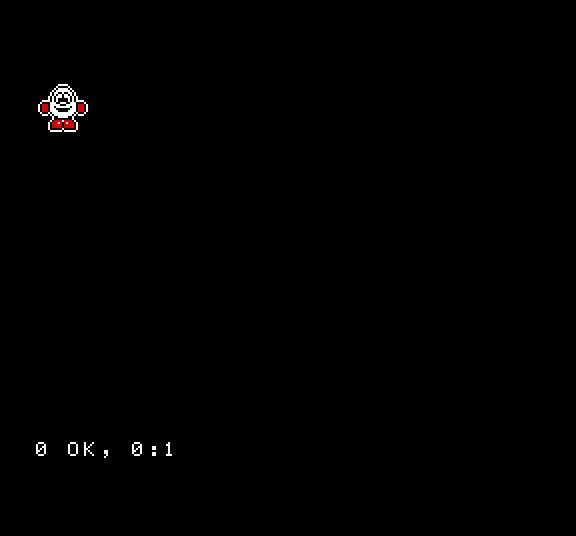
Where we can see now that Dizzy isn’t drawn on a white background.
Download the Disk Image
You can download the full disk image to run in SimCoupe or on your real SAM here;
https://github.com/pjgpetecodes/samcoupegraphics/raw/refs/heads/main/disks/4.dsk
Making it More Obvious
As the background is just plain black, the effect isn’t as obvious. What we can do though is draw a striped background, where we’ll be able to see all the background showing behind Dizzy.
Paint a Striped Background
Paint_Background:
                LD      HL,0             ; Point to the top-left screen byte
                LD      C,192            ; Number of screen rows
                LD      A,0x22           ; First stripe colour
;
Background_Row: LD      B,128            ; Screen width in bytes
;
Background_Byte:
                LD      (HL),A           ; Paint one screen byte with this stripe colour
                INC     HL              ; Advance to the next screen byte
                DJNZ    Background_Byte ; Continue across the screen row
                XOR     0x66            ; Alternate colours for the next stripe
                DEC     C               ; Count down the 192 screen rows
                JR      NZ,Background_Row ; Continue to the bottom of the screen
                RET                     ; Return when the striped background is ready
Here we;
- Point to the top left corner of the screen
- Set the Screen Width to 128 which is the Mode 4 Screen Width.
- Set the colour of the Screen Byte we’re at
- Advance to the Next Byte
- Continue until the whole row is drawn
- Alternate the colour for the next row
- Decrement the Row Counter
- Continue until we’ve painted all rows in stripes.
Once we’ve added this into our code, the result is;
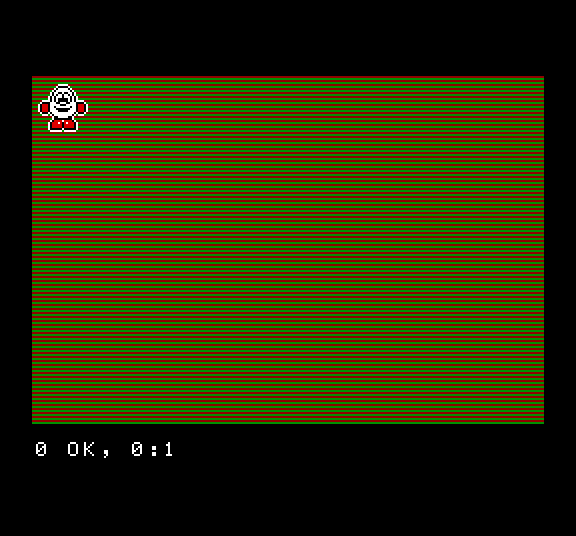
Where we can now see the full effect of the transparent pixels, with the striped background appearing fully behind Dizzy.
Improving by Removing
I mentioned a couple of times that this isn’t the most efficient way of interleaving the Sprite and Mask data, where we copy the interleaved data into a memory buffer.
Instead, we should actually store the Sprite and Mask data in an interleaved manner all in a single row;
Sprite1_1:    DEFB    0xFF, 0x00, 0xFF, 0x00, 0xFF, 0x00, 0xFF, 0x00, 0xFF, 0x00, 0xFF, 0x00, 0xFF, 0x00, 0xFF, 0x00, 0xFF, 0x00, 0xFF, 0x00, 0xFF, 0x00, 0xFF, 0x00, 0xFF, 0x00, 0xFF, 0x00, 0xFF, 0x00, 0xFF, 0x00
Sprite1_2:    DEFB    0xFF, 0x00, 0xFF, 0x00, 0xFF, 0x00, 0xFF, 0x00, 0xFF, 0x00, 0xFF, 0x00, 0xFF, 0x00, 0xFF, 0x00, 0xFF, 0x00, 0xFF, 0x00, 0xFF, 0x00, 0xFF, 0x00, 0xFF, 0x00, 0xFF, 0x00, 0xFF, 0x00, 0xFF, 0x00
Sprite1_3:    DEFB    0xFF, 0x00, 0xFF, 0x00, 0xFF, 0x00, 0xFF, 0x00, 0xFF, 0x00, 0xFF, 0x00, 0xFF, 0x00, 0xFF, 0x00, 0xFF, 0x00, 0xFF, 0x00, 0xFF, 0x00, 0xFF, 0x00, 0xFF, 0x00, 0xFF, 0x00, 0xFF, 0x00, 0xFF, 0x00
Sprite1_4:    DEFB    0xFF, 0x00, 0xFF, 0x00, 0xFF, 0x00, 0xFF, 0x00, 0xFF, 0x00, 0xFF, 0x00, 0xFF, 0x00, 0xFF, 0x00, 0xFF, 0x00, 0xFF, 0x00, 0xFF, 0x00, 0xFF, 0x00, 0xFF, 0x00, 0xFF, 0x00, 0xFF, 0x00, 0xFF, 0x00
Sprite1_5:    DEFB    0xFF, 0x00, 0xFF, 0x00, 0xFF, 0x00, 0xFF, 0x00, 0xFF, 0x00, 0xFF, 0x00, 0xF0, 0x0F, 0x00, 0xFF, 0x00, 0xFF, 0xFF, 0x00, 0xFF, 0x00, 0xFF, 0x00, 0xFF, 0x00, 0xFF, 0x00, 0xFF, 0x00, 0xFF, 0x00
Sprite1_6:    DEFB    0xFF, 0x00, 0xFF, 0x00, 0xFF, 0x00, 0xFF, 0x00, 0xFF, 0x00, 0xFF, 0x00, 0x00, 0xF0, 0x00, 0x00, 0x00, 0x00, 0x0F, 0xF0, 0xFF, 0x00, 0xFF, 0x00, 0xFF, 0x00, 0xFF, 0x00, 0xFF, 0x00, 0xFF, 0x00
Sprite1_7:    DEFB    0xFF, 0x00, 0xFF, 0x00, 0xFF, 0x00, 0xFF, 0x00, 0xFF, 0x00, 0xF0, 0x0F, 0x00, 0x0F, 0x00, 0xFF, 0x00, 0xFF, 0x00, 0x0F, 0xFF, 0x00, 0xFF, 0x00, 0xFF, 0x00, 0xFF, 0x00, 0xFF, 0x00, 0xFF, 0x00
Sprite1_8:    DEFB    0xFF, 0x00, 0xFF, 0x00, 0xFF, 0x00, 0xFF, 0x00, 0xFF, 0x00, 0x00, 0xF0, 0x00, 0xFF, 0x00, 0xFF, 0x00, 0xFF, 0x00, 0xF0, 0x0F, 0xF0, 0xFF, 0x00, 0xFF, 0x00, 0xFF, 0x00, 0xFF, 0x00, 0xFF, 0x00
Sprite1_9:    DEFB    0xFF, 0x00, 0xFF, 0x00, 0xFF, 0x00, 0xFF, 0x00, 0xF0, 0x0F, 0x00, 0x0F, 0x00, 0xF0, 0x00, 0x0F, 0x00, 0x00, 0x00, 0xFF, 0x00, 0x0F, 0xFF, 0x00, 0xFF, 0x00, 0xFF, 0x00, 0xFF, 0x00, 0xFF, 0x00
Sprite1_10:    DEFB    0xFF, 0x00, 0xFF, 0x00, 0xFF, 0x00, 0xFF, 0x00, 0xF0, 0x0F, 0x00, 0x0F, 0x00, 0x0F, 0x00, 0xF0, 0x00, 0xFF, 0x00, 0x0F, 0x00, 0x0F, 0xFF, 0x00, 0xFF, 0x00, 0xFF, 0x00, 0xFF, 0x00, 0xFF, 0x00
Sprite1_11:    DEFB    0xFF, 0x00, 0xFF, 0x00, 0xFF, 0x00, 0xFF, 0x00, 0x00, 0xF0, 0x00, 0xF0, 0x00, 0xFF, 0x00, 0xF0, 0x00, 0xFF, 0x00, 0xF0, 0x00, 0xF0, 0x0F, 0xF0, 0xFF, 0x00, 0xFF, 0x00, 0xFF, 0x00, 0xFF, 0x00
Sprite1_12:    DEFB    0xFF, 0x00, 0xFF, 0x00, 0xFF, 0x00, 0xFF, 0x00, 0x00, 0xF0, 0x00, 0xF0, 0x00, 0xF0, 0x00, 0x00, 0x00, 0x00, 0x00, 0xF0, 0x00, 0xF0, 0x0F, 0xF0, 0xFF, 0x00, 0xFF, 0x00, 0xFF, 0x00, 0xFF, 0x00
Sprite1_13:    DEFB    0xFF, 0x00, 0xFF, 0x00, 0xF0, 0x0F, 0x00, 0xFF, 0x00, 0xF0, 0x00, 0xF0, 0x00, 0xF0, 0x00, 0x00, 0x00, 0x00, 0x00, 0xF0, 0x00, 0xF0, 0x00, 0xFF, 0x00, 0xFF, 0xFF, 0x00, 0xFF, 0x00, 0xFF, 0x00
Sprite1_14:    DEFB    0xFF, 0x00, 0xFF, 0x00, 0x00, 0xF0, 0x00, 0x00, 0x00, 0x0F, 0x00, 0xFF, 0x00, 0x00, 0x00, 0xFF, 0x00, 0xF0, 0x00, 0x0F, 0x00, 0xFF, 0x00, 0x00, 0x00, 0x00, 0x0F, 0xF0, 0xFF, 0x00, 0xFF, 0x00
Sprite1_15:    DEFB    0xFF, 0x00, 0xF0, 0x0F, 0x00, 0x0A, 0x00, 0xAA, 0x00, 0x0F, 0x00, 0xFF, 0x00, 0xFF, 0x00, 0x00, 0x00, 0x0F, 0x00, 0xFF, 0x00, 0xFF, 0x00, 0x0A, 0x00, 0xAA, 0x00, 0x0F, 0xFF, 0x00, 0xFF, 0x00
Sprite1_16:    DEFB    0xFF, 0x00, 0xF0, 0x0F, 0x00, 0x0A, 0x00, 0xAA, 0x00, 0x0F, 0x00, 0xF0, 0x00, 0xFF, 0x00, 0xFF, 0x00, 0xFF, 0x00, 0xF0, 0x00, 0xFF, 0x00, 0x0A, 0x00, 0xAA, 0x00, 0x0F, 0xFF, 0x00, 0xFF, 0x00
Sprite1_17:    DEFB    0xFF, 0x00, 0xF0, 0x0F, 0x00, 0x0A, 0x00, 0xAA, 0x00, 0x0F, 0x00, 0xFF, 0x00, 0x00, 0x00, 0x00, 0x00, 0x00, 0x00, 0x0F, 0x00, 0xFF, 0x00, 0x0A, 0x00, 0xAA, 0x00, 0x0F, 0xFF, 0x00, 0xFF, 0x00
Sprite1_18:    DEFB    0xFF, 0x00, 0xF0, 0x0F, 0x00, 0x0A, 0x00, 0xAA, 0x00, 0x0F, 0x00, 0xFF, 0x00, 0xF0, 0x00, 0x00, 0x00, 0x00, 0x00, 0xFF, 0x00, 0xFF, 0x00, 0x0A, 0x00, 0xAA, 0x00, 0x0F, 0xFF, 0x00, 0xFF, 0x00
Sprite1_19:    DEFB    0xFF, 0x00, 0xFF, 0x00, 0x00, 0xF0, 0x00, 0x00, 0x00, 0xF0, 0x00, 0xFF, 0x00, 0xFF, 0x00, 0xFF, 0x00, 0xFF, 0x00, 0xFF, 0x00, 0xF0, 0x00, 0xF0, 0x00, 0x00, 0x0F, 0xF0, 0xFF, 0x00, 0xFF, 0x00
Sprite1_20:    DEFB    0xFF, 0x00, 0xFF, 0x00, 0xF0, 0x0F, 0x00, 0xFF, 0xF0, 0x0F, 0x00, 0x0F, 0x00, 0xFF, 0x00, 0xFF, 0x00, 0xFF, 0x00, 0xFF, 0x00, 0x0F, 0xF0, 0x0F, 0x00, 0xFF, 0xFF, 0x00, 0xFF, 0x00, 0xFF, 0x00
Sprite1_21:    DEFB    0xFF, 0x00, 0xFF, 0x00, 0xFF, 0x00, 0xFF, 0x00, 0xFF, 0x00, 0x00, 0xF0, 0x00, 0x0F, 0x00, 0xFF, 0x00, 0xFF, 0x00, 0x00, 0x0F, 0xF0, 0xFF, 0x00, 0xFF, 0x00, 0xFF, 0x00, 0xFF, 0x00, 0xFF, 0x00
Sprite1_22:    DEFB    0xFF, 0x00, 0xFF, 0x00, 0xFF, 0x00, 0xFF, 0x00, 0xFF, 0x00, 0x00, 0xF0, 0x00, 0x00, 0x00, 0x00, 0x00, 0x00, 0x00, 0x00, 0x0F, 0xF0, 0xFF, 0x00, 0xFF, 0x00, 0xFF, 0x00, 0xFF, 0x00, 0xFF, 0x00
Sprite1_23:    DEFB    0xFF, 0x00, 0xFF, 0x00, 0xFF, 0x00, 0xFF, 0x00, 0xF0, 0x0F, 0x00, 0x0A, 0x00, 0xAA, 0x00, 0xAF, 0x00, 0xAA, 0x00, 0xAA, 0x00, 0x0F, 0xFF, 0x00, 0xFF, 0x00, 0xFF, 0x00, 0xFF, 0x00, 0xFF, 0x00
Sprite1_24:    DEFB    0xFF, 0x00, 0xFF, 0x00, 0xFF, 0x00, 0xFF, 0x00, 0x00, 0xF0, 0x00, 0xAA, 0x00, 0xAF, 0x00, 0xA0, 0x00, 0xAF, 0x00, 0xAA, 0x00, 0xA0, 0x0F, 0xF0, 0xFF, 0x00, 0xFF, 0x00, 0xFF, 0x00, 0xFF, 0x00
Sprite1_25:    DEFB    0xFF, 0x00, 0xFF, 0x00, 0xFF, 0x00, 0xFF, 0x00, 0x00, 0xF0, 0x00, 0xAA, 0x00, 0xAA, 0x00, 0xA0, 0x00, 0xAA, 0x00, 0xAA, 0x00, 0xA0, 0x0F, 0xF0, 0xFF, 0x00, 0xFF, 0x00, 0xFF, 0x00, 0xFF, 0x00
Sprite1_26:    DEFB    0xFF, 0x00, 0xFF, 0x00, 0xFF, 0x00, 0xFF, 0x00, 0x00, 0xF0, 0x00, 0xAA, 0x00, 0xAA, 0x00, 0xA0, 0x00, 0xAA, 0x00, 0xAA, 0x00, 0xA0, 0x0F, 0xF0, 0xFF, 0x00, 0xFF, 0x00, 0xFF, 0x00, 0xFF, 0x00
Sprite1_27:    DEFB    0xFF, 0x00, 0xFF, 0x00, 0xFF, 0x00, 0xFF, 0x00, 0x00, 0xF0, 0x00, 0x00, 0x00, 0x00, 0x00, 0x0F, 0x00, 0x00, 0x00, 0x00, 0x00, 0x00, 0x0F, 0xF0, 0xFF, 0x00, 0xFF, 0x00, 0xFF, 0x00, 0xFF, 0x00
Sprite1_28:    DEFB    0xFF, 0x00, 0xFF, 0x00, 0xFF, 0x00, 0xFF, 0x00, 0xF0, 0x0F, 0x00, 0xFF, 0x00, 0xFF, 0x0F, 0xF0, 0x00, 0xFF, 0x00, 0xFF, 0x00, 0xFF, 0xFF, 0x00, 0xFF, 0x00, 0xFF, 0x00, 0xFF, 0x00, 0xFF, 0x00
Sprite1_29:    DEFB    0xFF, 0x00, 0xFF, 0x00, 0xFF, 0x00, 0xFF, 0x00, 0xFF, 0x00, 0xFF, 0x00, 0xFF, 0x00, 0xFF, 0x00, 0xFF, 0x00, 0xFF, 0x00, 0xFF, 0x00, 0xFF, 0x00, 0xFF, 0x00, 0xFF, 0x00, 0xFF, 0x00, 0xFF, 0x00
Sprite1_30:    DEFB    0xFF, 0x00, 0xFF, 0x00, 0xFF, 0x00, 0xFF, 0x00, 0xFF, 0x00, 0xFF, 0x00, 0xFF, 0x00, 0xFF, 0x00, 0xFF, 0x00, 0xFF, 0x00, 0xFF, 0x00, 0xFF, 0x00, 0xFF, 0x00, 0xFF, 0x00, 0xFF, 0x00, 0xFF, 0x00
Sprite1_31:    DEFB    0xFF, 0x00, 0xFF, 0x00, 0xFF, 0x00, 0xFF, 0x00, 0xFF, 0x00, 0xFF, 0x00, 0xFF, 0x00, 0xFF, 0x00, 0xFF, 0x00, 0xFF, 0x00, 0xFF, 0x00, 0xFF, 0x00, 0xFF, 0x00, 0xFF, 0x00, 0xFF, 0x00, 0xFF, 0x00
Sprite1_32:    DEFB    0xFF, 0x00, 0xFF, 0x00, 0xFF, 0x00, 0xFF, 0x00, 0xFF, 0x00, 0xFF, 0x00, 0xFF, 0x00, 0xFF, 0x00, 0xFF, 0x00, 0xFF, 0x00, 0xFF, 0x00, 0xFF, 0x00, 0xFF, 0x00, 0xFF, 0x00, 0xFF, 0x00, 0xFF, 0x00
Where we have now stored the Sprite Colour and then the Mask Data one after another. This means we no longer need the Build_Interleaved routine at all now. We can simply read the interleaved data directly from the place we define it.
The Full Interleaved Source Code
You can view the full source code for this article here;
The Full Interleaved Source Code
Download the Disk Image
You can download the final disk image here;
https://github.com/pjgpetecodes/samcoupegraphics/raw/refs/heads/main/disks/5-2.dsk