
Introduction
CLI baseline: The examples use Azure IoT CLI preview extension
azure-iot1.0.0b2, released 6 October 2026. Last reviewed against current Microsoft Learn guidance 5 November 2026. Release notes.
Welcome to this comprehensive blog series on building a real-world IoT device using Azure’s latest IoT Hub, Azure Device Provisioning Service (DPS) features, along with Microsoft-managed certificate infrastructure.
Click here to see what’s changed since the last preview
I’ve refreshed the series to match the current preview. DPS is required, while certificate management is optional. The credential a device uses to get onto DPS is separate from the operational certificate ADR can issue for IoT Hub.
I’ve also moved the sorter to Microsoft’s unified
Microsoft.Azure.Iot.Device 2.0.0-preview4.
ConnectionClient handles DPS and the Hub connection; TelemetryClient sends
our Skittle readings. The custom C# provisioning protocol and legacy
Microsoft.Azure.Devices.Client are gone. The sorter calls the SDK directly;
AzureDpsFramework supplies configuration, durable CSR/key/issued-chain
persistence and optional ADR ARM helpers. Its session API remains for package
compatibility. Microsoft’s SDK design and feature matrix
and unified examples
are the starting points for the new API. The package is still a preview.
The series defaults to an X.509 bootstrap certificate for DPS and a
CSR-issued X.509 operational certificate for the Hub. Standard
symmetric-key/X.509 profiles and both CSR onboarding flows remain,
along with .NET 10 and our existing Hub. The SDK discovers its assigned
endpoint/profile through DPS. There’s a bounded
--cloud-self-test --config PATH for provision/connect/telemetry/disconnect
without physical hardware. SDK retry/reprovision and optional IoT Hub renewal
APIs are available, but automatic certificate renewal isn’t implemented here.
The sorter uses MQTTnet 5; this client-side transport choice does not require
an MQTT 5-capable IoT Hub or any cloud topology change.
The resource walkthrough now uses the current CLI flow and system-assigned identities, links DPS before IoT Hub, and creates an enrollment group linked to the ADR certificate policy. It doesn’t create a device. You can also connect eligible existing services, but linking them is permanent.
I’ve clarified which credentials are for DPS onboarding and which are issued for IoT Hub. The policy belongs to an ADR intermediate CA and sets the operational certificate validity; this example uses a 30-day policy. The Microsoft-managed lifecycle includes renewal and revocation, with limitations for intermediate CAs signed by an external CA. I’ve kept the distinction between service capabilities, SDK APIs and the lifecycle code actually in this sample.
Contents
- Introduction (this post)
- A DPS Primer
- Creating DPS, IoT Hub and ADR Instances
- Understanding X.509 and CSR Workflows
- The Device Application
What You’ll Build
By the end of this series, you’ll have:
- ✅ A complete IoT device application (Skittle Sorter)
- ✅ Automated device provisioning with DPS
- ✅ Microsoft-managed X.509 certificate issuance
- ✅ Azure Device Registry integration
- ✅ Practical security patterns and considerations
- ✅ Full automation scripts
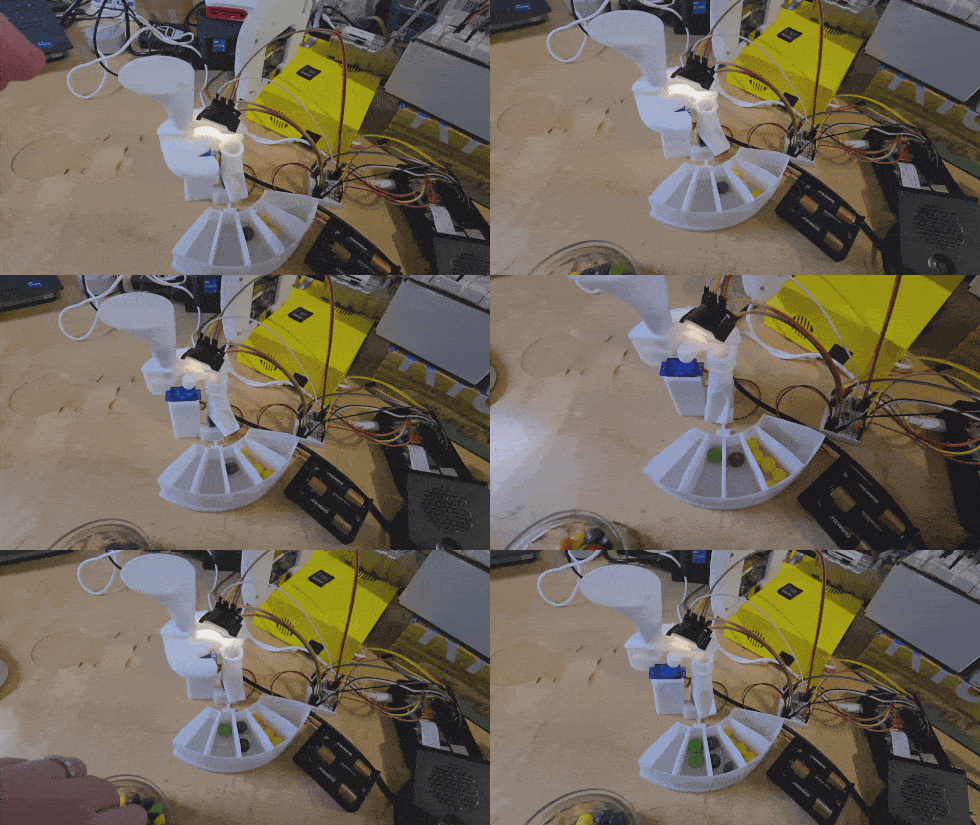
The series uses a 3D-printed Skittle sorter for the physical build, but it’s optional — you can run everything with mocked hardware. Still, it’s a fun build if you want the full experience.
⚠️ Warning: This guide is for testing and demo purposes only. Do not use self-signed X.509 certificates in production.
This series focuses on patterns and principles. We’ll use self-signed certs to make the learning path simple and reproducible, but the concepts are foundational and transfer directly to production setups. In practice, you’ll replace self-signed certs with production-grade certificates issued by a trusted CA (or a managed service).
Preview Status and Current Guidance
Current preview status: Azure IoT Hub integration with Azure Device Registry (ADR) and Microsoft-backed X.509 certificate management remain in public preview and aren’t recommended for production workloads. ADR is generally available for Azure IoT Operations; its integration with IoT Hub is still in preview.
ADR represents IoT Hub devices as Azure Resource Manager resources. Each IoT Hub links to one ADR namespace, and multiple hubs can share a namespace. You can create a new Hub or connect an eligible existing Hub. Connecting an existing Hub is permanent and can’t be reversed; it doesn’t interrupt Hubs that you leave unconnected. This series’ setup script creates a dedicated new Hub. DPS is required for every IoT Hub preview scenario, whether or not you enable certificate management.
Certificate management is optional. It manages operational X.509 certificates used to authenticate to IoT Hub after onboarding with a separate credential. The device submits a CSR during provisioning; DPS validates the onboarding credential and coordinates issuance from the namespace’s ADR certificate authority. The device’s private key remains on the device. The locally created certificates in Part 4 are an example of an X.509 onboarding credential; they are separate from the ADR-managed operational certificate authority and policy.
Supported Regions
The current supported regions for IoT Hub, ADR, and DPS in this preview are:
- Australia East
- Japan East
- Central US
- UK South
Preview Pricing
Starting in October 2026, ADR integration and certificate management are available at no cost during preview. IoT Hub and DPS are billed at their standard rates.
Official Docs & Announcements
- Get started with ADR and connect services: https://learn.microsoft.com/en-gb/azure/iot/device-registry/get-started-azure-device-registry
- ADR CA hierarchy: https://learn.microsoft.com/en-gb/azure/iot/concept-managed-ca-hierarchy
- Set up managed root and intermediate CAs: https://learn.microsoft.com/en-gb/azure/iot/how-to-create-policy?tabs=cli
- Azure IoT Hub “What’s New”: https://learn.microsoft.com/en-us/azure/iot-hub/iot-hub-what-is-new
- Azure IoT Hub + ADR preview announcement: https://techcommunity.microsoft.com/blog/iotblog/azure-iot-hub-with-adr-preview-extending-azure-capabilities-and-certificate-mana/4465265
- Azure Device Registry integration: https://learn.microsoft.com/en-us/azure/iot-hub/iot-hub-device-registry-overview
- Certificate management: https://learn.microsoft.com/en-us/azure/iot/iot-certificate-management-overview
- Create a certificate policy and select it in a DPS enrollment: https://learn.microsoft.com/en-us/azure/iot/how-to-create-edit-certificate-policy?tabs=cli
- Current deployment steps: https://learn.microsoft.com/en-us/azure/iot-hub/iot-hub-device-registry-setup
The sample later in this series now uses the official unified .NET SDK, not a custom provisioning transport. Our helpers retain the application-specific configuration and durable certificate files. Check current service and SDK documentation before changing pinned preview versions.
Learning the Traditional DPS Approach
If you’re interested in learning the traditional DPS workflow with self-signed X.509 certificates (without the new ADR and certificate management features), I’ve written a series of blog posts covering that approach:
Using Azure Device Provisioning Service with Self-Signed X.509 Certificates
Two Ways to Use This Series
Option 1: Set Up the Current Preview
Use our updated step-by-step Azure CLI walkthrough in Part 3 to create the ADR namespace, a new IoT Hub, DPS, role assignments, and enrollment. It retains the CLI method in this series, aligned with Microsoft’s current Azure CLI deployment guide. The walkthrough creates a new Hub for this example. The current getting-started guide also supports connecting eligible existing Hubs; that connection is permanent and can’t be reversed. DPS is required for every IoT Hub preview scenario.
After reviewing the current prerequisites and setup, use the repository’s device application instructions in Part 5.
Option 2: Step-by-Step Tutorial (This Series)
Follow along post-by-post to understand why and how everything works. You’ll learn:
- DPS concepts and architecture
- Azure resource setup
- X.509 certificate workflows
- .NET implementation details
Prerequisites
- Azure Subscription (free trial available)
- Azure CLI with IoT extension (install guide)
- PowerShell 7+ (install guide)
- .NET 10 SDK (download)
- Basic C# and IoT concepts understanding
Series Outline
- Introduction – Series overview and current preview changes
- A DPS Primer – Understanding Device Provisioning Service
- Creating DPS, IoT Hub and ADR Instances – Azure resource setup
- Understanding X.509 and CSR Workflows – Certificate concepts and workflows
- The Device Application – Following the .NET sample
Why This Series?
Most IoT tutorials use symmetric keys or manual X.509 certificate generation. This series shows you:
- How to use Microsoft’s new certificate management features
- How to use the unified .NET device SDK with durable application credentials
- How to integrate ADR for advanced device management
- How to apply security-minded IoT patterns while accounting for preview limitations
Next Steps
In the following sections, we’ll:
- Start with the DPS primer
- Create DPS, IoT Hub and ADR resources
- Follow the X.509 and CSR walkthrough
- Run the device application